The timeline editor is a visual tool for expressing properties of concurrent systems. A property is defined as a relation on a set of potentially interesting system events, and zero or more constraints. To check if the system satisfies a timeline property, a timeline specification is translated into a test automaton and checked against the system code with the Spin model checker. Spin uses the test automaton to uncover any feasible system execution that can violate the property.
In the later phases of the FeaVer project we used the timeline editor to specify properties for the call processing code of a new switch. The system model was extracted from the ANSI C source code, and combined with timeline properties. The error traces produced by Spin were converted back into execution traces through the source code of the switch, to aid in the diagnostics of the errors.
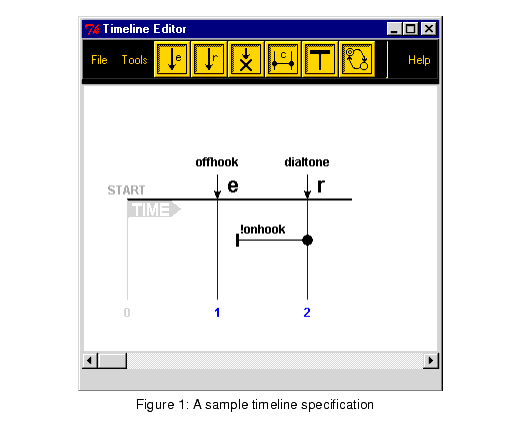
A timeline specification, like the one shown in Figure 1, has a wide horizontal bar close to the top of the drawing canvas. Time progresses along the bar from left to right. Along the timeline bar there are vertical bars. These are marks which are used to record the relevant system execution steps. The marks do not represent clock ticks, but mere subsequent points in time. The marks indicate moments when events of interest to a system property take place.
Three types of events can appear on timelines:
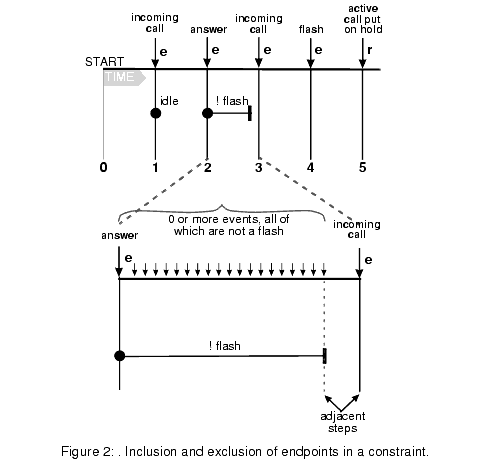
A timeline can also define constraints. Constraints persist over certain intervals of the timeline. For instance, if there is a telephone switch requirement that the system must respond to an offhook by providing dialtone, a constraint: `in the absence of onhook events' can be defined for the interval between when the offhook occurs and when dialtone is provided, otherwise, many executions of no interest would be included in the check. A constraint, denoted as a horizontal line placed below the main timeline, starts and ends at a timeline mark. The constraint can optionally include or exclude the begin or end mark to which it is attached.
Marks are shown as small blue vertical lines to which event names are attached. Each mark can only represent one single event. Nothing is implied about the amount of time that can pass between two subsequent marks on a timeline. If event e2 immediately follows event e1 on the timeline, for instance, we cannot conclude anything about the amount of time that would pass between these two event occurrences. We can only conclude that there are no other events of interest to the property that should occur between e1 and e2. There may of course well be other event occurrences in this interval that are not of interest to the property that is specified. This is illustrated in Figure 2.
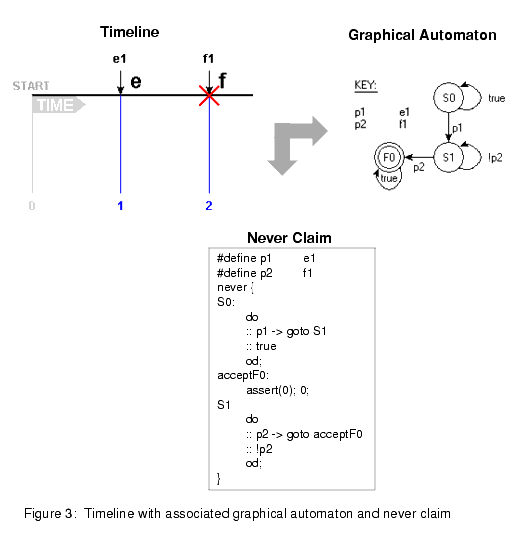
Timeedit can generate the test automaton for
a property in either graphical or textual form, as shown in
Figure 3.
The graphical version is useful for visual inspection only;
the textual version can be used by Spin to perform the actual
system test.
For more information contact: Margaret Smith mhs@research.bell-labs.com
The timeline editor is available from the Bell Labs software distribution site
under a standard non-exclusive limited use license, see:
http://www.bell-labs.com/topic/swdist.