 |
|---|

This chapter introduces the concept of a thread. A thread is essentially the execution of a particular task (or expression) and several threads can be active simultaneously giving (the impression of) parallel processing. We describe how threads are available to the S programmer and user and how they are created and controlled. Also, we detail the complexities of using threads and offer S level functions which help solve these complexities. Also we describe how threads can enhance the performance of a Graphical User Interface. Multi-threaded S - chapter 5, page 92 offers a detailed description of the technical details involved in our implementation of threads.
This is very similar to a session with a computer rather than a particular application. However, given current operating systems, users do not have to perform the tasks sequentially but can have several being processed simultaneously. If one of the tasks, or subtasks, is time consuming for the computer, the user can switch his or her attention to another task that requires more interaction. In this way, the user can be more productive and can work more naturally. We are used to this style of interaction in the UNIX world (and WIN95 and the Mac but without the command line) when there are several windows open each with their own prompt and acting relatively independently.
Note that each task is made up of an ordered sequence of subtasks. Each of these subtasks is a command which is made up its own subtasks - normally function calls. A thread is the evaluation instance of a task. It is an execution stream in which the subtasks of a given task are evaluated sequentially and in the normal manner with each function call being evaluated in its own local domain. We can have several threads processing the same task - each an individual instance of the evaluation of that same task. This is the analogous to having several processes performing the same task (with output going to different locations).
What makes the thread concept useful is that it allows a user to perform several tasks within an application (or process) simultaneously and effectively have multi-processing at any task level. Returning to our S example, the user can issue the command(s) necessary to read data from a file and fit a linear model to this data and have this task evaluated in one thread. Next, s/he can process a command to produce a plot for another dataset in a separate thread, and so on.
From a more technical point of view, we will consider an S user level thread to be one created by the user to perform a particular set of tasks. It is an instance of an S evaluator with the same properties that exist in the non-threaded version of S S - blue book. Namely, the task is composed of one or more top-level expressions which are evaluated as sequence of function calls in different frames that behave like the stack for a C level application. Local variables are handled as usual within their own thread and there are as many frame 1 objects as there are threads being evaluated. The evaluation of the body of each task acts independtly of the other threads and proceeds at the same time as the other threads.
The IEEE Portable Operation System Interface (POSIX) developed a "standard" for a portable programmer interface to thread functions for C programmers in 1990. An alternative standard was proposed by UNIX International. These have prompted an increase in use of threads as they have been accompanied by the release of several libraries for many platforms that make the possibility of developing threaded code that will run unaltered on many machines.
synchronize() and assigning components
of the output to different names based on the process identifier,
etc. The new S user level threads described below do not
completely remove the responsibility of synchronizing the
subtasks, but does make it easier by providing explicit
classes and methods for this end and also helping
to identify potential conflicts between the subtasks.
Also, there is a significant reduction in the overhead
of the computations using threads as only a single process
is needed irrespective of the number of subtasks
employed as opposed to that number of identical processes.
It should be clear that each of these event tasks (or callbacks) could be performed in another thread and the next event processed immediately, without waiting for the task to be completed. In this way, one task could cancel another task and the interface would be responsive to user actions at all times.
Another example of the benefit of threads is where one task is to interactively read input from the user. It is difficult to arrange for other tasks to be interleaved in a single threaded environment during the reading of the input, even when the user is not actually entering data, but between keystrokes. A multi-threaded environment allows user input to be read by a dedicated thread while the other tasks perform their actions. This is an example of input/output which blocks until it has completed. It is a situation in which a threaded version can improve performance of an application significantly.
Dialogs and not having to handle callbacks but can block in the calling thread for the user to terminate the dialog
A thread is created with the thread() function. This currently has 16 arguments but has only 1 required argument (this isn't even required as one can establish an idle thread). We will describe each argument later but first will look at what happens when a thread is created.
The important/required argument is expression. This is an S expression which is considered to be the task for this thread. For example, we can create a thread that performs cross-validation for a particular fitting procedure with the following call.
   thread(Quote({
            n = length(y)
            num.iterations = n/k
            index = sample(1:n,size=n)
            fits <- vector("list",num.iterations)
            for(i in 1:num.iterations) {
              do.fit()
            }
          })
         )
This illustrates that the expression can be a collection
of expressions in the usual S way enclosed by a {} pair.
When a call to thread is evaluated, the arguments are processed and a new evaluator is created in its own C level thread. The expression supplied as the task is appended to the empty queue for this evaluator called the task queue. This is similar to an S list (a linked list internally) containing expressions that constitute the tasks for this thread to perform. In the example above, the entire expression made up of several sub-expressions becomes the first and only entry on the task queue. The task queue, we will see later, allows one thread to have a task completed in another thread and provides some sort of communication between threads. More on this below.
Each evaluator thread is implemented internally as a simple
loop that retrieves the next expression from the task queue
and evaluates it, and starts again with the next task.
The details regarding the evaluation of the task are very similar
to evaluation in the non-threaded S, but constitute a minor
generalization of that evaluation.
Each thread has its own private search path where
it searches for objects referenced in the expressions
it evaluates during its life. (This search path can be modified
by expressions evaluated by thread in the usual way.)
When a thread is created,
a new session frame (or temporary
non-disk database) is also created
by default (see argument
toplevel for an exception
to this). This is attach()ed to the
thread's search path in the first position. This implies
that all toplevel assignments (of the form x <- foo())
evaluated by this thread are committed to this database.
Other entries in the search path are discussed
below
Should the threads session frame be frame 0 and the first entry in the search path. It seems like they are the same thing in the threaded world. This only arises intoWe note here that the evaluation of an expression within a thread differs only from the evaluation in version 3 and the non-threaded version 4 of S because of the minor change to the search path semantics. Otherwise, the evaluation within a thread proceeds in the standard manner. We should stress that any C base language routines that are called via theassign(frame=0)assign(w=0)How about this:assign(frame=0)commits to the session frame. This is just a special frame that isn't in any search path explicitly, but implicitly This is harder to do in the current setup. What do we want? Usual frame search, current frame, frame 1, and now,
- search path and toplevel assignments
- the threads frame
- the parents thread frame
- any threadLock objects
.C(),
.Call(), or .Fortran() interfaces
will behave correctly and in the usual manner as
they are executed in the C level thread
associated with the evaluator.
The computations within a thread,
in either S or a base language,
may of course be interleaved
in real time with those of other threads.
With this description of thread relationships, at any given moment, there is a thread hierarchy similar to the widget hierarchy described in the earlier chapters. The top thread is the special system created thread which has no parent. It has children each of which act as the root a (potentially trivial) (sub-)hierarchy made up of its children. And so we can think of a hierarchy as a recursive set of sub-hierarchies.
The children of a given thread can be obtained using the function children(). This takes a thread as its single argument and returns its children threads. If no argument is passed, the calling thread (thisThread() or self()) is assumed.
A thread can get its parent thread object using the function parent(). This, like children(), takes a single thread as an argument and returns the parent of that thread. If the argument is not supplied, the calling thread is assumed.
With the two functions above, one can easily produce functions that will return the hierarchy (using the widget hierarchy's tree class) and that will apply a function to each of the threads in the tree. The necessary classes and functionality for this are already present in S and the GUI library. However, we feel that this is not a necessary facility in the threaded version and we want to discourage applying functions to easily gathered collections of widgets, especially based on the relationships to other threads based on how they were created. Instead, synchronization between threads should be better defined and rely on shared variables.
The relationship between a thread and its parent is significantly more important during the creation of that thread than at any other time (as we implied in the last paragraph). Each thread object has certain attributes that control the run time behavior of the thread. These include things such as the connection on which output and error messages are written and the relative importance of the thread ( priority. While such attributes can be specified in the creation call to thread() and during the life of the thread, it is more common that the default values are used. For several of the attributes, the default values are inherited from the parent thread's value at creation, in the same manner that the environment for a process is inherited from the parent process in UNIX.
We introduce a class which embodies information similar to UNIX's process groups and Java's Thread Groups which we also call the threadGroup class. This is a simple container object whose elements are thread objects. The purpose of this class is to allow collections of related threads to be easily referenced and manipulated. Many functions that operate on a thread, such as suspend(), start(), ps(), isAlive(), etc. have been developed to take an arbitrary list of thread and threadGroup (and also vectors and lists of these objects) objects and to apply the operation to each (recursively, if appropriate) thread. In the case of a threadGroup object, the operation is applied recursively to the elements of this object.
We define methods for the functions
addElements()
and the extraction
and assignment operators
[() and [<-()
which make managing these objects easier.
The output from
the function children()
can also be used to create a
threadGroup object
for easy access to the relevant threads.
recover(), etc.).
Clearly if all threads were to display their output
on the same console or terminal, the result
would be very confusing as the from each would
be interspersed with output from other threads running
in parallel. Similarly, if each thread received input
from a single source the target of the input
would be ambiguous or alternatively one thread must block
all others requesting input.
The practical solution is for each thread
to have its own
standard connections -
input, output and error.
By default, these are inherited from the thread's parent
at creation but
can be specified directly in the call
to thread().
A thread can use the familiar functions
such as sink()
to change the value of each connection.
The ability to have input and output
on different connections is most useful
in a graphical environment in which multiple windows
may exist. We envisage a situation
in which a single S session has multiple
applets or mini-applications running simultaneously,
each in their own window that contains a message area.
When the debugging tools are used, these would be accessed
via a graphical interface connected to the
threads input and output connections.
A thread's priority is dictated by
the priority
attribute in its threadAttributes
object. This is a positive unbounded integer.
Using the reverse of UNIX's nice
scale, we use larger values to indicate a higher
priority for a thread.
The exact value of a threads priority is implementation
dependent and should not be used as a portable form
of pseudo-synchronization between threads. Instead,
the priority values should be used only to indicate relative
importance.
Other threads have no useful return value and are used
for the purposes of their side effects. For example, graphical
interfaces are evaluated "in the background" so as to allow
the user to issue more commands at the command line and the return
value of the application is of no significance.
A second example is a Help facility that is run as a separate thread
for use by all other threads. This is effectively a "daemon"
thread.
Threads with no significant
return value are still managed by the
Evaluator Manager and their return value is cached
using memory that may never be released.
To remedy the situation, a thread can be created
in detached mode.
This is governed by the
detach attribute of the
threadAttributes class for a particular thread and can be
either T or F.
The former indicates that the thread is to be considered detached.
This implies that Evaluator Manager
is to manage it differently by discarding its return value when it completes,
and also by not permitting any other thread to call
join with that thread as (one of) its targets.
The purpose of this attribute is to allow developers to create clearer code and make more efficient use of resources. See below for a description of when the returned values for a thread are released by the Evaluator Manager
In order to avoid such situations, a thread has
an access
attribute which is a list of threads or
threadGroup objects which
can request certain actions by that thread.
The list of such operations is given in table ?.
The access attribute
can be specified either as a list of the relevant threads
and threadGroups which have
access, or a logical value indicating that all threads (T)
or no thread (F)
should be granted access.
No facility for granting access to all but a given list of treads
is provided.
By default, only one user level thread has access to this thread and that is its parent. This encourages the practice of encapsulation by having each thread act on its children recursively. Access permissions do not prohibit functions such as join(). We believe that use of such functions requires knowledge of the current thread structure in the session and so will only be used by knowledgeable developers and users. Note also that the root threadnot user created, which gives the user access to the command line, has access to all threads so that the user can terminate any application or thread. However, we strongly recommend that each application have a more graceful way of terminating such as a GUI component (e.g. menu item or button) that invokes a termination callback.
| cancel |
|---|
| suspend |
| sendTask |
Cancellable Threads and Deadlock
In certain situations, especially given a multi-processor
machine, it can be useful to have several threads
performing the same basic operation but perhaps using
different methods of finding the result.
When one thread finishes the computation, the other threads
should also terminate to avoid unnecessary computations
the results of which will be discarded. It is possible
to write the code for each task so that each checks
the value of shared variable to determine if it
should continue its task. This is similar to
checking events
in callbacks described above and is undesirable for the same reasons
as well as being inefficient due to the necessary locking
of the shared variable. Instead, we offer an alternative
mechanism for organizing that one or more threads terminate.
The function cancel()
takes an arbitrary collection of threads in the usual manner
and sends a request to each to cancel itself.
The following code illustrates how this might be used.
  # create a thread group for the children of this thread
  group = threadGroup("methods")
  l = threadLock("lock", one.finished = F, attach=2)
  for(i in 1:k) {
     thread(Quote({method(k); one.finished = T}), group=group)
  }

   # wait until one thread has finished signalled by
   # the variable one.finished
  getLock(l, condition = Quote(one.finished == T))

   # now cancel all the other threads in the group.
   # smart enough to know that the already terminated
   # thread is terminated.
   # Note this parent thread has access to all its children,
   # by the default value of the access attribute.
  cancel(group)
(Note that cancel()
only has an effect on a target thread if the calling thread has
access permission for that thread.)
Consider a potential problem with canceling a thread. A collection of threads may share more than the single variable that indicates that one has terminated. In this case, access to these variables must be protected by one or more threadLock objects. If a thread A sends a cancellation request to a thread B and the latter immediately terminated, it is possible that a lock may still be held by thread B. Other threads that require access to the variable(s) protected by this lock would block during their evaluation and potentially several threads could be deadlocked. In some cases however, such deadlock potential may not be a serious problem as all the related threads may be discarded immediately as in our example above. Another example of this is when we quit an application, and so terminate all its threads. However, in other cases, it may be vital to protect against a canceled thread holding a lock. While the programmer can, once again, write code to ensure that such a situation never happens, this is tedious and inelegant. Instead, it is best handled by using the cancel attribute of a thread. This is an indicator with three possible values indicating the different states of a thread. These values and meaning are
"IGNORE" - ignore cancellation requests,
"SYNCHRONOUS" -
handle cancellation requests immediately (and possibly
leave a lock in the possession of this canceled thread),
"ASYNCHRONOUS" -
handle cancellation requests at the next suitable
point in the code so as to avoid potential
deadlock due to
"IGNORE" is simple to
understand in that all cancellation requests
are ignored. (This can be done through the
Evaluator Manager
to avoid sending messages that can't be honored).
The second ("SYNCHRONOUS") implies
that when the target thread next becomes active
it will immediately terminate, irrespective of
its current state.
The third state ("ASYNCHRONOUS")
is only slightly more complicated.
When the "canceled" thread is evaluating
a function that would cause it to block,
such as getLock(),
tryGetLock, etc.,
the thread can be canceled if the number of locks
it holds is zero. Otherwise, the evaluation continues
until the lock count decreases to 0 during
the evaluation of a call to one of these functions.
[Not wild about all this, but do need cancelability]
The developer can change the value of the threads cancel attribute dynamically during the life of the thread. This allows him or her to protect certain sections of code from cancellation requests, ensuring that a confused state does not arise.
All of the attributes defined in threadAttributes are inherited at creation time from the parent thread. After the new thread is created, the parent's and child's values may be the same but are unrelated in that changing one set of values does not change the other. The function thread() allows a user to override the parental inheritance by taking optionally both a threadAttributes object and values for each of the individual components. If the attributes argument is not passed, the parent's current threadAttributes is used. The individual slot values specified in the call are then merged into this object and the thread created with the values in this thread. These can be changed at any time using the function threadAttributes() and specifying the individual values.
   counter = 0
   while(T) {
     counter =  counter + 1
   }
could also be assigned as the body of a function
that takes
Irrespective of the form of the task, when each of the expressions that make up this task (either toplevel or in the body of the function) is evaluated, the variables referenced therein are found in the usual S manner using the evaluation frames and search path. Two different tasks can be performed given the same expressions based on the values of the variables referenced in the expressions. In order to make this easier to organize, the creator of a thread can specify named values which act as thread specific variables. The user specifies a list of values, each with a given name and these values are assigned to the toplevel database of the thread (position 1 in the search path) using the list's names vector. This is a similar but simpler method of passing an argument to a thread available in the Pthreads specification.
For example, consider the following code executed in thread P, the parent thread. We have two equal length lists of predictor matrices (x.data) and vectors of dependent values (y.data). The intent is to fit the ith element of y.data to the ith element of x.data in a separate thread.
 expression = Quote(return(lm(y ~ x,data=list(x = x, y = y))))
  for(i in 1:length(x)) {
    thread(expression, data=list(x=x.data[[i]],y=y.data[[i]]))
  }
The expression used as the task body is the same
for each thread, but the input variables are different
and local to each thread.
When the thread's evaluator searches for the object
x referenced in the
data argument of lm,
it searches in the current frame (frame 3),
then in frame 1. Not finding it in either place,
it looks in the threads session frame/database
which is frame 0 and finds it there. Since this is local
to each thread, all the threads in the example
operate on different values and return the relevant fitted
model to the evaluator manager
for access by the parent
thread at a later time.
start
gives us the control to do this.
If F is passed as this argument's value,
the thread is started in suspend mode which means
that another thread must call start()
with that thread as its argument to have it process the
task given to in the call to thread().
This can make the performance seem better to a user as
the delay between an event and the completion of the callback
is reduced because most of the work was performed when the user
was unaware of it (see
[Young Motif Debugging]
).
standardEval(expression)on each of the elements in the task queue. It is reasonable however to consider that a thread may wish to handle its task queue differently and evaluate each element differently. For example, a thread might choose use a different evaluator model as is described in chapter 11 of the [blue book] such as one that uses a lisp syntax, or logs all input from the task queue to a particular connection, etc. The idea is that there are operations that are common to each task sent to this thread and rather than have these operations embedded in each element of the task queue, they can be specified once in the action that defines how the thread behaves. This is the motivation for the action argument in the thread() function. It allows an arbitrary function taking one argument, the next element from the task queue, to be evaluated as the thread's task.
The readerThread class is a formal representation of an idea introduced early in the development of version 4 of S. The purpose of a readerThread object is to monitor an S connection object and to evaluate a function each time input is readable on that connection. The function reads the available input and processes it, leaving the connection "empty" of input and the process repeats itself with the reader waiting for more input. A readerThread object can be as a (uni-directional or one half of a bi-directionl) communication mechanism with another process, or with a thread in the same process. These can be used also to read data from an instrument and process it inline. Prior to threads being available in S, the precursor of this class was used to implement the necessary event loop mechanism to control graphical interfaces introduced earlier and the standard graphics devices that were extended to allow multiple simultaneous devices. The key feature of the readerThread class is that the associated evaluator thread is idle while no input is available on the connection, but the other threads in the S environment continue performing their tasks.
A readerThread object
is created using the function
setReader().
This takes a connection and a function that is passed
one argument - the connection - each time data is available
on the connection. In addition to these arguments, the same
arguments that are passed to thread()
can also be provided to control the creation of the
thread object.
The waitThread
class is used to represent the concept of task that is to be
performed after a given period of time. The task may be repeated
a given number of times or indefinitely until it is terminated
by an external source (another thread or the termination of the process).
For example, user defined garbage collection functions can be invoked
periodically to remove temporary files that are no longer being used,
or a cache being used by the Help Daemon might remove older
files every 30 minutes.
The interval between each evaluation of the thread's task does not have
to be homogeneous but can be specified as a vector of wait times.
An object of class waitThread
is created using the constructor waitThread().
The same arguments as those supplied to thread()
can be supplied to this function to specify the properties of the underlying
thread object.
The argument repeat
can be a logical value indicating whether the task is to
be evaluated indefinitely or not.
If the value T is passed for this argument,
the vector interval is
replicated as if to have infinite length using the usual rules of S
for extending vectors to a given length.
If it is supplied as a numeric vector,
the values are taken as intervals between successive evaluations
and the task is performed that number of times.
There are three main categories of synchronization between threads. The characteristics of these categories are that they synchronize
A command/expression block that must be executed alone is termed a critical section.
A list of expressions is a critical section, c with respect to a lock, l if c is an element of a set, C, of critical sections such that only one element of C can be active. By active we mean currently being evaluated.
For each set of critical sections, the mechanism which controls
access to each element across the relevant threads is called
a threadLock().
This is a database, but in this context it is used simply
as a locking device.
Each critical section is enclosed in a pair of
commands that acquire (getLock())
and release (yieldLock()) the common lock
used to protect
all of the critical sections.
  getLock(lock)
     critical section commands
  yieldLock(lock)
The key point is that there is only one lock used to protect all the
related critical sections.
The command that acquires the lock is getLock().
When this is invoked, the calling thread attempts to acquire the
specified lock. If another thread already holds that lock, the
getLock() function waits until that thread releases
it. Then one of the threads waiting for the lock acquires it
and returns from its call to getLock().
Then that thread enters its critical section.
The thread that holds the lock
releases it at the end of its critical section
using the yieldLock()
function and allowing another thread to acquire the lock and enter
its critical section.
This mechanism therefore ensures that only one thread can be executing
its critical section. The threads enter a queue for the lock.
Note that the we are talking only about ensuring that expressions are evaluated in a protected manner. Ensuring that one critical section executes before another is discussed below and cannot controlled by threadLock objects alone.
The threadLock object
and associated methods give the same behavior as the
Java synchronized keyword. It is modeled on and
implemented with the Pthread's mutex data structure.
x[[length(x)+1]] = local.value,several different values for x are possible when the each thread completes the evaluation. One possible sequence of events is as follows. Thread A evaluates the sub-expression
length(x)+1
and then yields to thread B, which evaluates the same expression
giving the same value.
Then thread A becomes active and assigns local.value
to the relevant element of the list x.
Next, thread B becomes active and does the same assignment with its
own value for local.value.
Of course, thread A might make the assignment after B leading to a
different result.
This is a race condition and clearly must be handled in a different
way.
An even simpler example that arises commonly in S
is when on thread evaluates
x = x + 1and a second evaluates
x = x - 1If x has an initial value of 5, the possible values for x when both threads have completed are 4, 5, 6.
The difficulty lies in the fact that the variable x is shared by the two threads. Any access to this variable constitutes a critical section. We use a common threadLock object to protect each critical section as described above. So, each of the expressions in the last example would be rewritten as follows:
 getLock(x.lock)
   x = x+1
 yieldLock(x.lock)
and
 getLock(x.lock)
   x = x-1
 yieldLock(x.lock)
This ensures that each of the expressions is completed atomically and the correct result occurs. Of course, the order in which these expressions are evaluated is not controlled by the lock. The order is only controlled given that one of the threads holds the lock. See below for how to synchronize the order of thread evaluation.
One of the issues we glossed over in the examples above was how two threads accessed the same object. This relates to accessing the variables such as x and also the threadLock objects used to lock the critical sections. ThreadLock objects, are special since they are also databases. Each different S object that is a copy of a database is in fact a copy of the handle/identifier for the database. In this sense, it refers to the same database. This allows us to pass the same threadLock object to several threads using the data argument of thread() function.
We can't pass a copy of each variable as this would yield several independent variables, each local to its own thread rather than one common variable. Instead, a convenient place to assign a shared variable protected by threadLock l is in the threadLock itself. Since this is a database, we can perform the usual database operations such as assign(), remove(), get(), etc. and place the variable in this database. This makes it convenient to locate and also establishes an obvious connection between the lock and the variable(s) it protects.
Since each threadLock object is a database, we can
attach() it to the search path.
The same locking procedures should be used to ensure exclusive
access to the elements in the database, but attaching the threadLock
allows simpler syntax for accessing the data.
For example,
  getLock(lock)
    x = get("x",where=lock)
      .
      .
      .
     x[[length(x)+1]] = local.value
    x = assign("x",x,where=lock)
  yieldLock(lock)
could be written
  getLock(lock)
   attach(lock, pos=1)
      .
      .
      .
     x[[length(x)+1]] = local.value
   detach(lock)
  yieldLock(lock)
We do not recommend this style of using threadLocks,
but in certain circumstances it can be used to make code simpler
to follow (in some ways!). In general however, it makes small
sections of the code more readable, but the overall flow of the code
more complicated to follow.
get(), assign(), objects(),
remove() and rm() -
are protected by a lock for that database.
In this way, threads accessing the same Database
objects are automatically synchronized from the user's viewpoint.
(Almost) All functions
that operate on a database
call internal code which attempts to get the database specific
lock. If another thread, B, currently holds that lock, the
other thread waits until B has completed the database operation.
The user does not have to be aware of this locking mechanism
as it is performed automatically.
However, the user can already the lock through the user level
synchronization mechanisms (getLock()
). In this case, we would have almost certain deadlock
as the inner attempt to get the lock in the nested locks
would never return. Situations do exist and are common however
in which the user might want to lock a database
and then access it. This is a special case of locking
and is handled appropriately to "do the right thing".
This can be implemented using an internal mutex/lock
that is different from the user's lock/threadLock.
Alternatively, we can use the same lock
and make this the single point in the implementation
where we allow a form of recursive mutexes.
Basically, in this situation, the internal code that
locks the database attempts to get a lock (using tryGetLock())
and fails. It returns with an error so more expensive checking
is performed. The code compares the calling thread
to the thread that owns the lock (cached in the Evaluator Manager.
If these are the same, the code proceeds without
acquiring the lock since it is guaranteed to be held by the
active thread. If these threads are different, the code
blocks waiting to acquire the lock.
Independent threads versus
cooperative sub-threads
of a task.
Locks and Values
A different style of synchronization
involves one thread waiting for other threads to change
the state of shared variables.
The waiting thread must test the condition it is waiting
for while it holds a lock on the shared variables (to ensure
that other threads aren't simultaneously modifying these variables)
but release the lock if the condition is not satisfied.
In this way, other threads can acquire the recently released lock
and perform operations that might make the condition
true. These other threads release the lock they held to alter the
shared variables
and signal the waiting thread that some of the shared variables have
changed.
The waiting thread can now compete for the lock and reevaluate
the condition. When the condition evaluates to true, the
thread holds the lock and can continue knowing the state of the
shared variables.
This basic approach is available to the
programmer via the same getLock()
function mentioned above.
The condition
argument gives the expression that is to be evaluated.
The variables referenced in the condition must (for the current
implementation) be
in the thread's frame 0 or more usually in the
threadLock object supplied to getLock().
The getLock() function arranges
to evaluate the condition when it acquires the specified lock.
If the condition evaluates to F, the lock
is released and the function waits for an event
on the threadLock object. The events are constituted by
any modification of the threadLock (i.e. remove and assign).
When such an event occurs, the getLock()
function attempts to acquire the lock again and re-evaluate the
condition.
This cycle continues until the condition evaluates to T
and then the function returns, with the lock held.
In the following code we have two threads, A and B. Thread A
| Thread A | Thread B |
      ..
      ..
getLock(l, condition=
        Quote(length(messages)!=0))
 # messages has non-zero length
 # and A holds the lock

    processMessages()

 # finished processing the messages
 # removing them from
 # the queue, so give up the lock to
 # allow other threads
 # put messages onto the queue.
yieldLock(l)
|
           ..
           ..
 # acquire the lock in order to
 # change messages
 getLock(l)
       # add a new message.
       # This is assigned to the
       # threadLock object
    tmp = messages
    tmp[[length(tmp)+1]] = "New Message"
    assign("messages",messages,where=l)
     #
 yieldLock(l)
|
|---|
Certain types of conditions occur frequently and can be optimized by recognizing them. The first of these is identified by passing a name (character string) as the condition, rather than an expression. This condition simply evaluates the object given by name and is shorthand for
Quote(get(name)==T).A second common type of condition is to check for the existence of an object in the threadLock or for other threads modifying (assigning to or removing) an object. This is described in ThreadLock Events
The purpose of these two special condition types is to avoid the overhead of evaluating arbitrary expressions, but instead to exploit access to the internal structures of the lock that can make such tests significantly more efficient.
The condition expression should contain no side effects that modify any database or local variable. This is mainly due to the fact that the evaluation of the condition may be performed in the Evaluator Manager on behalf of the calling thread for efficiency reasons. The search path of the thread will be temporarily used by the Evaluator Manager during the evaluation to ensure the correct name-space of the expression.
join(), barrier()
join() function does
not allow several threads to synchronize with each other at a known rendevouz
spot. For example, consider the case in which we have k (where k > 1)
threads performing some different parts of an iterative calculation. Each thread
is responsible for computing its own values as part of a larger data structure
used as input to the next step of the iterative process. In such a case,
each of the k threads must stop at the end of each iteration
and wait for the other k-1 threads
to finish that iteration also. Otherwise, one thread would start the next iteration
with an inconsistent input structure made up of partially updated entries.
The Barrier class is a synchronization mechanism which solves this type of problem. Each barrier acts on a set of threads or threadGroup object. The barrier object is available to each of these threads and it keeps track of which threads have reached the barrier point. Each thread signals the barrier object that it has reached the rendevouz point by calling a function that returns only when all of the threads have reached that point. When this function returns, the thread can proceed but unlike other locking mechanisms holds no lock associated with the barrier. As a result all threads can proceed, in the general setup.
The Barrier class can be implemented using the threadLock class and associated methods. The S level functions and class definition are described in a separate document.
Consider the earlier example in which a thread writes to a file and must not be interrupted by the exit function. If we extend the number of threads writing to different files to two or more, we want to ensure that neither is interrupted by the exit function but that both can be active simultaneously. A second example in which partial exclusiveness improves the parallel nature of an application is one in which we have data that is read in several critical sections but modified by in relatively few critical sections. In this case, we want to allow the critical sections that read the data to be active simultaneously but to ensure mutual exclusiveness for a critical sections that write to the variable.
The standard use of the threadLock objects will not yield this behavior. However, it should be relatively clear that we can construct a lock that has this selective exclusiveness using the threadLock class and the condition argument of getLock. The type of lock that gives us this partial exclusiveness is called a Reader-Writer Lock. The name is easy to understand given the second example in the previous paragraph. A description of how this is implemented using the threads API is given in a separate document.
join().
This is useful when a thread must wait until a collection
of other threads have finished their tasks and hence the overall
task is complete before operating on the result of this task.
Returning to our cross-validation example,
the parent thread must wait for all its child threads to perform
their part of the cross-validation result before aggregating the
output from each of these subthreads.
This can be implemented simply in the parent thread as
   group = threadGroup()
   expression = Quote(fit(x,y))
   index = sample(1:length(y),length(y),F)
   increment = length(y)/k
   ctr = 1
    # create threads
    for(i in 1:num.parts) {
        id = index[ctr:(ctr+increment)]
        new.thread = thread(expression, data=list(x=x[id,],y=y[id]))
        group = addElement(new.thread, group)
        ctr = ctr + increment + 1
    }

    join(group)   <- this is the important line that blocks until
                            all the sub-threads have completed.
The call to join() with a
threadGroup object
as the argument returns only when each of the threads in that
group has terminated.
| Name | Event |
"assign" | any assignment to the object of the given name by another thread |
|---|---|
"remove" | the object is removed from the database. |
"exists" | the object exists in the database. |
type argument
have occurred.
The thread that calls getLock() in
this way is responsible for determining which event occurred.
An example of using getLock() in this manner is given here. Let us suppose that we want to display a histogram for each of k different data sets and each histogram is controlled by the value of the variable bin.width. Within a thread P, the parent thread of each thread displaying one of the k histograms, we create a threadLock object and initialize the variable bin.with to some suitable value. For ease of explanation, we attach the object to the second position in the database. This allows children threads to access this threadLock object and its associated variables through the inheritance of the search path without using get() explicitly.
           lock = threadLock("bin.width",bin.width=1.0,nclass=10,
                               attach=2)
We might create each of threads that produces
the histogram plots in the following manner
     for(i in 1:k) {
       thread(Quote({
        dev = x11(paste("histogram",i))  # open a new graphics device
        while(T) {
           Hist1(data,bin.width=bin.width,nclass=nclass,device=dev)
              # wait for an assignment on bin.width
           getLock(lock,condition=threadLockEvent("bin.width","assign"))
           yieldLock(lock) # give up the lock and go to the top of the loop
        }
        }), data=list(data=x[[i]],lock=lock)
       )
     }
This arranges for each thread to create a new graphics device
and to draw the relevant histogram, using the thread specific
data passed in the creation call and found in the thread's primary
database. Next, the thread waits for notification
by the threadLock object
created in the parent thread (and in position 3 of the search path for
each of the k threads).
A second circumstance in which sendTask()
proves useful is a client-server model or a Daemon thread
providing some centralized service such as a help facility.
The help() function might be implemented
simply as
      help <- function(object) {
       sendTask(substitute(showHelp(object)),list(object=object), thread=help.thread)
      }
This simply redirects the evaluation of the call to showHelp()
to the appropriate thread which can take care of the details for the whole process.
Another example arises when one thread has a search path and variable values that would be complicated to reproduce in another thread but suitable for evaluating a particular expression. A thread can then organize to have this suitable thread evaluate the expression rather than attempt to recreate the suitable environment. The server may elect to create a thread pool as in the first example.
sendTask(Quote(exit(NULL)),thread=B)
so that the latter will call exit() itself.
One problem that arises with this is the elapsed
time and resources used by thread B before it processes
this request in its task queue. If thread B is in the midst of
a lengthy computation, it may continue to consume valuable resources
while completing that task unnecessarily. Instead, we need a mechanism
by which we can get a more immediate termination of the thread and
differentiate between a thread terminating itself and being canceled
by another. We use the function cancel
for this end. This takes cancels an arbitrary collection of
thread and threadGroup
objects and arranges for the
Evaluator Manager to force the thread to cancel itself.
The thread that calls cancel() can optionally wait
for each of the threads it is signalling to complete the cancellation
before returning from the cancel call via the argument
wait. This is a logical value with T
indicating that the call should wait for notification from each of the target threads
and F indicating that the call should make the request and return
immediately allowing the threads to cancel themselves asynchronously.
Exactly the point at which a thread acknowledges the cancellation request is described above.
In a manner similar to the cancel function, one thread can request that any other thread temporarily suspend its execution. That thread remains suspended until some other thread calls the function start() with the suspended thread as (one of) its argument(s). When this happens, the previously suspended thread continues from the point it was originally executing.
The Evaluator Manager shares some of the features of a kernel that manages the process for an operating system. It provides encapsulated access to several of the internal aspects of user threads such as
When a thread terminates, it can return a value (including its toplevel database/session frame) which can be recovered by other threads that join() on it . The Manager provides a central location in which the return value from each thread is cached for use in other threads.
When the user wants to perform a task in a thread, the Manager can choose to not create a new thread but to employ an existing thread that is idle. This can be more efficient and allows a simple and local form of thread pools.
The manager can also arrange to trace the acquisition and release of the lock of a threadLock object. This allows the manager to know which thread holds each lock an can be requested to determine if deadlock exists for a group of threads. The Manager also handles the waiting of the different threads on a condition of a a variable in different threadLock objects. This allows the manager to report information about the state of different threads and also report on and/or avoid potential synchronization deadlock. This is a potentially useful facility for debugging complicated synchronization situations.
S is a statistical analysis application, so it is appropriate that statistics relating to itself be available to the user. The manager records information about the time a thread was created. The manager can arrange to be notified each time a different thread becomes the active thread and so can keep detailed records of the CPU time used within this process of each thread. Additionally, the Manager can be requested to keep statistics about certain objects used in specific threads involved in threading so as to be able to get runtime statistics on particular synchronization sections and strategies.
In a future implementation of the user level threads, the manager will manage the scheduling the different user threads in a fully portable manner. It might provide hooks to override the thread libraries scheduling algorithm and make this available to the S programmer for developers to experiment with different scheduling mechanisms.
One of the rôles of the Evaluator Manager is to store
thread specific information.
As more threads are created, the list of
thread information objects could grow and consume a sizeable
section of the processes memory resources.
Accordingly, the evaluator manager attempts to
perform a simple form of garbage collection
to release the unnecessary objects.
The manager decides what thread information objects
are unnecessary as follows.
If a particular thread is created with the value T for
the detach
attribute, the return value is ignored by the evaluator manager
and discarded. When the thread terminates, all related information
is discarded.
Alternatively, for a non-detached thread,
the
access attribute governs the lifespan of the threads return value.
If the
access is a list of threads and threadGroups,
the Evaluator Manager
caches the thread information, including the return value,
until all threads in this list are themselves terminated.
In the absence of preprocessing/compiling the thread tasks,
the thread information cannot be released earlier without
removing the ability of any of the threads in the access list
to query the information about this thread.
Threads not in the
access list cannot join() on this thread
and so the return value and thread information are redundant.
If the
access attribute has the value T, implying that
all threads, that exist now and in the future,
have access to this thread, the return value is never
released by the Evaluator Manager.
This is another reason for seriously considering the
access attribute of a thread.
A list of all the threads managed by the
Evaluator Manager
is returned by a call to
threads().
This function can be passed either a character vector
describing the classes of threads we are interested
in, or a function that takes a single argument, a thread
object, and returns T if this thread
should be returned or F otherwise.
This allows us to perform a more efficient filter
that could be performed at the S level.(This may not
be implemented.)
The task queues for a collection of threads is returned as a list of expression vectors by the function threadQueue(). This takes a collection of threads in the usual manner of specifying threads to a function. A list of threads can be created using threads() with a suitable filter argument.
Different attributes and statistics are reported for a collection of threads via the function ps(). The different attributes that can be requested are described include elapsed time, input, output and error connections, the current task being evaluated, etc. A complete list is given in the ps Attributes vector documentation. The same style of filter as in the function threads(). This selects the threads of interest and the attributes argument specifies which attributes are to be returned for each thread.
xps() is a dynamic version of ps() similar to the UNIX command top. This continuously displays the relevant attributes of the selected variables periodically with a specifiable interval. The output is displayed in a window and allows the user to operate on the different threads. (This can be trivially implemented using an HTML widget and formatting the output of ps() as HTML).. The command has the same signature as ps() with an additional argument for specifying the interval between updates. The filter supplied is reused to potentially include threads created between updates.
strtok is used
to find the instances of particular tokens/characters
within a target string and expects to be called
repeatedly for the same string within a loop.
The first time it is called, it caches the target
string for use in future calls.
Clearly, if two threads are calling this routine
simultaneously, a race condition exists as they share
the same instance of a variable and hence the same data.
Until the library required is made thread-safe a developer must create his or her own ad hoc methods for ensuring that only one thread is executing in that library at a given time. This typically involves providing a single lock for the library that a thread must acquire before calling a routine within that library. This can be complicated and can introduce synchronization bugs into the code that would not appear if the library were thread safe.
Details of how both the internal and user level threads are implemented in the current version are given in Chapter ?.
Other cases where treating a thread as an object include the concept of tread migration. The idea is simple and relates to the situation in which for some reason, such as limited resources on a machine, it is better to move a task to another machine, but not to have to lose the work already completed by this task. This can be useful when a simulation or some lengthy computation takes longer than expected. Rather than terminating the application, the task can be moved to another more appropriate machine.
The thread functions described here also allow for simpler control of all the tasks within a session by the Evaluator Manager for the purpose of suspending them, writing them to disk, etc.
In the future, we might implement several of the standard methods such as matrix multiplication, Fourier transformations, etc. in a library of parallel functions. Additionally, other statistical operations might be translated to a parallel framework allowing them to exploit multi-processor machines that are becoming more familiar (SMP supported by Linux since Kernel 2.0). Code that works in a threaded environment typically works on a multi-processor machine.
S being a function language avoids many of the difficulties
associated with non-thread-safe libraries. The models
library however does make use of some static variables,
but typically through evaluation frame 1.
(The latter means that such a function is thread safe since each
each thread has its own evaluation frame 1, but it is not
reentrant as if such a function calls itself,
the second instance will overwrite objects in evaluation frame 1
which are to be used after that instance returns.)
We will endeavor to ensure that libraries are thread safe and
as reentrant as possible.
gdb or Sun's dbx or the more advanced
GUI debuggers such as xdbx).
These allow the user
to examine existing code and to alter its behavior through the debugger
rather than directly.
There are differences between debugging in S and in compiled
languages such as C/C++ or Fortran, not least of which is
the lazy evaluation employed by S.
However, user level threads naturally
allows for debugger tasks running in parallel with
the task(s) that are the focus of the debugging session.
We can think of an threaded S process in our setup as a
master process coordinating and controlling many sub-processes
through the Evaluator Manager.
We can investigate the utility of a
debugger object
which can be ``attached'' to a
running thread or ThreadGroup (in the same way as the current version 4 debug
``mode'' is invoked).
Integrated into a graphical interface, such a debugger
might make code development and correction simpler
for developers and user's alike.
The debugger would utilize the synchronization
methods for threads allowing it to be notified of
any changes to the evaluation frames and stack of the
thread being debugged and also of any evaluations.
Also the synchronization primitives would
allow the debugger to control
the evaluation in other tasks much as
the
ptrace()
[Linux Kernel
Internals] does for UNIX kernels.
The debugger is also a good example of where the access permissions for a thread are useful. The debugger can be considered as a high priority and privileged thread. In this sense, it gets to run in preference to most other threads in the process, and specifically, in preference to its attached thread. When (an instance of) the debugger is attached to a collection of threads (or threadGroup), it arranges for the relative priorities to favor the debugger's thread. The privilege of the debugger allows such a reordering of the priorities. Also, the privilege of the debugger thread permits it to halt the thread being debugged. In a similar way, other ``applications'' can be granted such privileges. For example a monitor might need this to gather statistics about a thread by querying it and perhaps altering its priority/scheduling information.
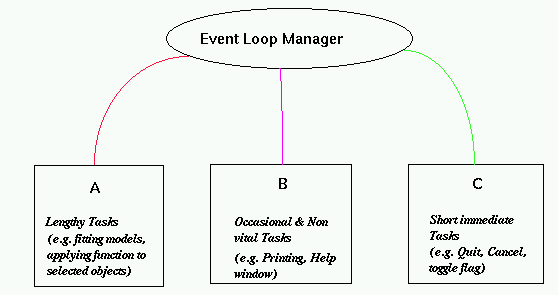
Most GUIs consist of many callbacks which can be grouped into 3 basic categories: short and quick, lengthy callbacks and lengthy but occasional and non-vital callbacks. The short and quick category includes callbacks such as toggling the value of an option through a menu, invoking the exit callback, ... Lengthy callbacks usually perform the interesting features of the application such as fitting models based on the current state of the interface, redrawing a display, applying a function to each of the selected nodes in a tree displayed on the screen. In our context, many of these callbacks can be characterized by their reliance on functions that are not directly related to the interface but are used more generally and also that these callbacks provided the primary functionality of the application. Lastly, the "lengthy but occasional and non-vital" category includes callbacks that print an object such as the graphics display, etc. or bring up a help window and loads a document. The purpose of using this category is to allow these callbacks to be queued and given low priority since they are not vital. Also, since they are "occasional", the likelihood of one being queued because another is currently being evaluated is small.
These categories allow us to employ a simple idea for a GUI application. Somehow¶ the callbacks are assigned to the thread categories above (or sub-categories within these). Threads are created for each category at the initialization of the application. The event loop processes each event by extracting the relevant callback and determining the associated thread. It then uses sendTask() to have the callback expression evaluated by that thread. Pictorially, the running application functions as shown in figure ?
|
|---|